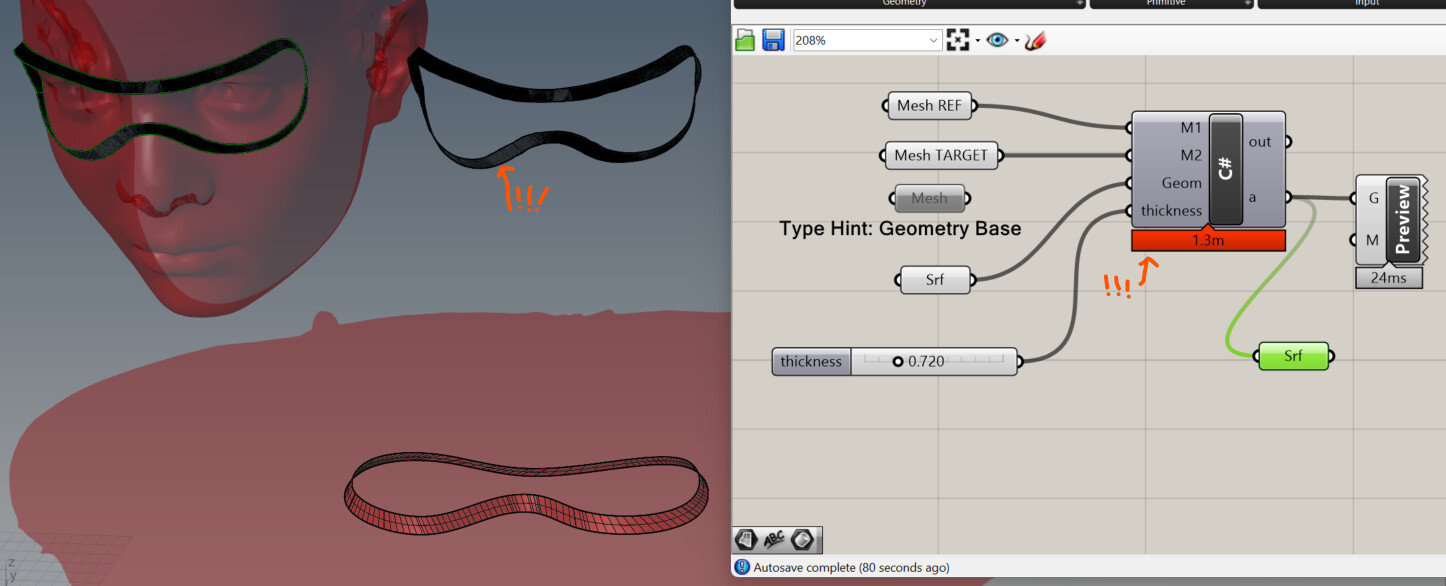
Ok, a bit slow for surfaces… it creates a very complex surface.
But nevertheless amazing! I would be glad to have it as a new Rhino tool.
// Grasshopper Script Instance
// by By Daniel Piker 250604 v2
#region Usings
using System;
using System.Linq;
using System.Collections;
using System.Collections.Generic;
using System.Drawing;
using System.Threading.Tasks;
using Rhino;
using Rhino.Geometry;
using Grasshopper;
using Grasshopper.Kernel;
using Grasshopper.Kernel.Data;
using Grasshopper.Kernel.Types;
#endregion

public class Script_Instance : GH_ScriptInstance
{
    #region Notes
    /*
      Members:
        RhinoDoc RhinoDocument
        GH_Document GrasshopperDocument
        IGH_Component Component
        int Iteration

      Methods (Virtual & overridable):
        Print(string text)
        Print(string format, params object[] args)
        Reflect(object obj)
        Reflect(object obj, string method_name)
    */
    #endregion

    private void RunScript(
		Mesh M1,
		Mesh M2,
		GeometryBase Geom,
		double thickness,
		ref object a)
    {
        Mesh offset = M2.DuplicateMesh();
        OffsetMesh(ref offset, thickness);
        var morph = new ThickMeshMorph(M1,M2,offset);
        morph.Morph(Geom);
        a = Geom;
    }

    void OffsetMesh(ref Mesh M, double d)
{
  M.Normals.ComputeNormals();
  var normals = M.Normals.ToFloatArray();
  for (int i = 0; i < M.Vertices.Count; i++)
  {
    double dist = d;
    M.Vertices.SetVertex(i,
      M.Vertices[i].X + dist * normals[3 * i],
      M.Vertices[i].Y + dist * normals[3 * i + 1],
      M.Vertices[i].Z + dist * normals[3 * i + 2]);
  }
}
public class ThickMeshMorph : SpaceMorph
{
  Mesh RefMesh;
  Mesh TargetInner;
  Mesh TargetOuter;

  public ThickMeshMorph(Mesh RefMesh,Mesh TargetInner,Mesh TargetOuter)
  {
    this.RefMesh = RefMesh;
    this.TargetInner = TargetInner;
    this.TargetOuter = TargetOuter;
  }

  public override Point3d MorphPoint(Point3d Pt)
  {
    MeshPoint mp = RefMesh.ClosestMeshPoint(Pt,0);
    return (TargetInner.PointAt(mp) * (1 - Pt.Z) + TargetOuter.PointAt(mp) * Pt.Z);
  }
}
}
Yes, morphing Surfaces and Breps will be slower, however, if we add the option to preserve structure (so for NURBS objects it does not add new control points), it gets faster:
MeshMap_Thick3.gh (612.7 KB)
2 Likes
Yeah, this is a charm!
// Grasshopper Script Instance
// by By Daniel Piker 250604 v3
#region Usings
using System;
using System.Linq;
using System.Collections;
using System.Collections.Generic;
using System.Drawing;
using System.Threading.Tasks;
using Rhino;
using Rhino.Geometry;
using Grasshopper;
using Grasshopper.Kernel;
using Grasshopper.Kernel.Data;
using Grasshopper.Kernel.Types;
#endregion

public class Script_Instance : GH_ScriptInstance
{
    #region Notes
    /*
      Members:
        RhinoDoc RhinoDocument
        GH_Document GrasshopperDocument
        IGH_Component Component
        int Iteration

      Methods (Virtual & overridable):
        Print(string text)
        Print(string format, params object[] args)
        Reflect(object obj)
        Reflect(object obj, string method_name)
    */
    #endregion

    private void RunScript(
		Mesh M1,
		Mesh M2,
		GeometryBase Geom,
		double thickness,
		bool preserve,
		ref object a)
    {
        Mesh offset = M2.DuplicateMesh();
        OffsetMesh(ref offset, thickness);
        var morph = new ThickMeshMorph(M1,M2,offset);
        morph.PreserveStructure=preserve;
        morph.Morph(Geom);
        a = Geom;
    }

    void OffsetMesh(ref Mesh M, double d)
{
  M.Normals.ComputeNormals();
  var normals = M.Normals.ToFloatArray();
  for (int i = 0; i < M.Vertices.Count; i++)
  {
    double dist = d;
    M.Vertices.SetVertex(i,
      M.Vertices[i].X + dist * normals[3 * i],
      M.Vertices[i].Y + dist * normals[3 * i + 1],
      M.Vertices[i].Z + dist * normals[3 * i + 2]);
  }
}
public class ThickMeshMorph : SpaceMorph
{
  Mesh RefMesh;
  Mesh TargetInner;
  Mesh TargetOuter;

  public ThickMeshMorph(Mesh RefMesh,Mesh TargetInner,Mesh TargetOuter)
  {
    this.RefMesh = RefMesh;
    this.TargetInner = TargetInner;
    this.TargetOuter = TargetOuter;
  }

  public override Point3d MorphPoint(Point3d Pt)
  {
    MeshPoint mp = RefMesh.ClosestMeshPoint(Pt,0);
    return (TargetInner.PointAt(mp) * (1 - Pt.Z) + TargetOuter.PointAt(mp) * Pt.Z);
  }
}
}
2 Likes
@DanielPiker , Hi again!
I was testing the above script (version 3) and notice that, if I input curves, the thickness doesn’t work anymore.
Would be nice if thickness could work for both breps and curves by the same component, to have a complete tool.
Could you please do a quick update, for the sake of consistency?
Thanks again!
The ‘thickness’ value is effectively a vertical to mesh normal scaling factor. So an input point 1 unit above the XY plane ends up at 1 * thickness units away from the mesh.
It does not extrude objects - if you want to turn curves into extrusions in the mesh normal direction, you’ll need to do a vertical extrusion before connecting to the Geom input.
1 Like
Yes, that’s what i’m doing.
I was thinking, that, in the case of curves, the thickness can extrude the mapped curves based on the normals of the mesh…
The reason being that mapping the curves and extruding them might be faster to compute than extruding and mapping the geometry. Specially when there’s a lot of geometry, like this:
Flow Along Mesh could also benefit from a Rigid option, for example, in case of this hexagonal mesh, the hexagons remain planar and have the same edge lenghth but the gaps in between them change… obviously some will intersect but this is to be solved by design.
Apart from this I would really like to see Flow Along Mesh implemented in Grasshopper by default. Thanks again for the help.
1 Like