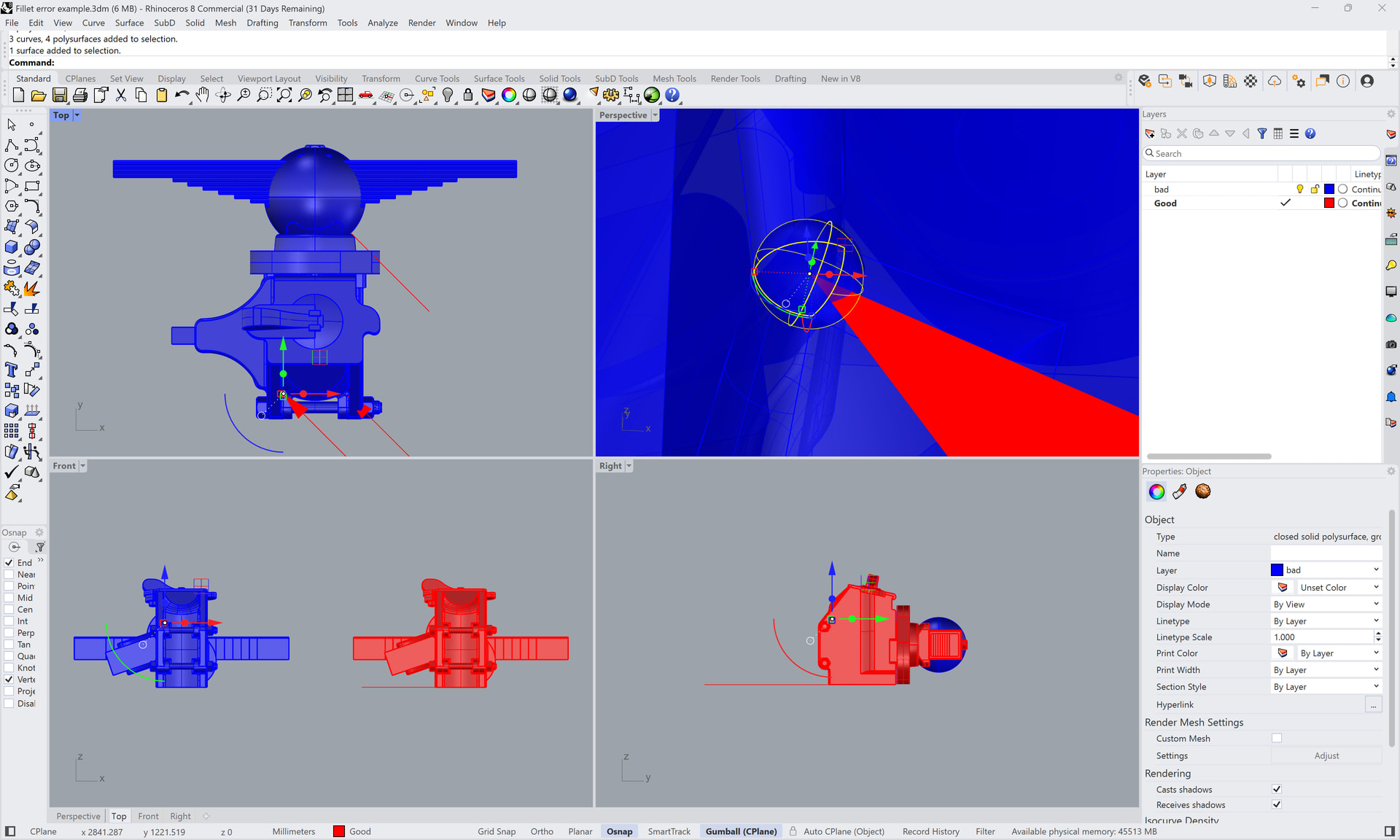
After 30 years using AutoCAD I’ve switched to Rhino, but I have a large library of AutoCAD models to use. Generally Rhino opens the ACAD models without any significant issues (It’s great actually, and I’m not complaining). There’s one consistent problem that varies between minor to annoying though, and it’s one present in many of my models.
ACAD fillets between three orthogonal edges generally convert incorrectly at the corner. Where fillet radii are common, instead of a smooth internal surface there is a sphere. Where the radii differ there’s a torus. There’s occasionally similar errors for reasons I’m less certain of. These surfaces are connected, so they need to be searched for manually.
The attached file shows all of these behaviours. The blue is the converted object, the red is manually repaired. Instances of the common fillet issue are indicated by the arrows. The large blue sphere is one of the similar problems, though not arising from 3 orthogonal edges. Not highlighted, but there are some small torus shaped artifacts in the socket where the leaf spring locates as well.
This is not hard to fix in most cases, the larger problem can be having to search the model to find the instances.
For anyone with similar problems looking for a manual fix (for each instance):
Attached file relates to the earlier one. I no longer have AutoCAD so the file contains material not pertinent. However, when opened in Rhino it should display the behaviour described.
What’s happening is the trimming of the sphere or torus is backwards. What I mean by that is the part that is supposed to be trimmed away is what remains and the part that remains is what should be trimmed away.
You can fix the improperly trimmed spheres in your file by extracting the sphere and untrimming it and the trim it again correctly using the 3 edges of the hole as cutting objects.
You can also fix the hole by using the script found here. To fix the hole extract and delete the defective spheres and then with the script first set the radius (.1mm) and then click on any two of the 3 fillets that surround the hole.
Also there is a command in Rhino called SphereTangentToThreeSurfaces that can make the trimmed sphere in those corners. To use that one you have to pick the 3 planar surfaces aroound the hole to get it to make a trimmed sphere.
Thanks. I see this as a bug report. Sure, the incorrect surfaces are fixable, and I have been doing that, but it’s got tiresome so I thought I’d flag it.
It’s a pernicious bug as it can be easily overlooked and could be difficult to identify all instances in a complex model. If Rhino just left a hole it would be easy to find and sort, but creating incorrect geometry is problematic.
Saving SAT from AutoCAD and importing into SolidWorks produces solids. Saving STEP and SLDPRT from SolidWorks and importing into Rhino produces closed polysurfaces without any fillet problems.
While that’s interesting as a workaround (and possibly as debug data), it doesn’t help anyone (like me) who doesn’t have a current AutoCAD or SW license.
The point is that there might be an alternative to spend a lot of time working in Rhino to fix the fillet problems. I just made a suggestion base on tools I have. You might try Plasticity . Plasticity has received some praise here on the Rhino forum for its filleting capabilities
The Studio version has DWG import but the free trial does not. You might contact their support and have them convert a few of your DWG files to see if it would work. $299 for a permanent license is a pretty good deal to save many hours of work if it is possible to simply open the DWG file and save it as a STP that opens in Rhino without issue.
Perhaps a Plasticity user here on the forum with the Studio version might convert a file for you to see if it will work.
I get where you are coming from, and I expect there is a workaround that may work. Interestingly I’ve been working with some .dwgs generated by TurboCAD and they don’t seem to show the same issue.
But the broader picture is that I chose Rhino on the basis that it would open my AutoCAD models and it’s UI was similar enough that the learning curve would be shallow.
For me fixing the artifacts is not really the problem. The issue is more about time wasted if I fail to spot them. Yes, workarounds can be useful, but software that works as it should is the comprehensive answer.