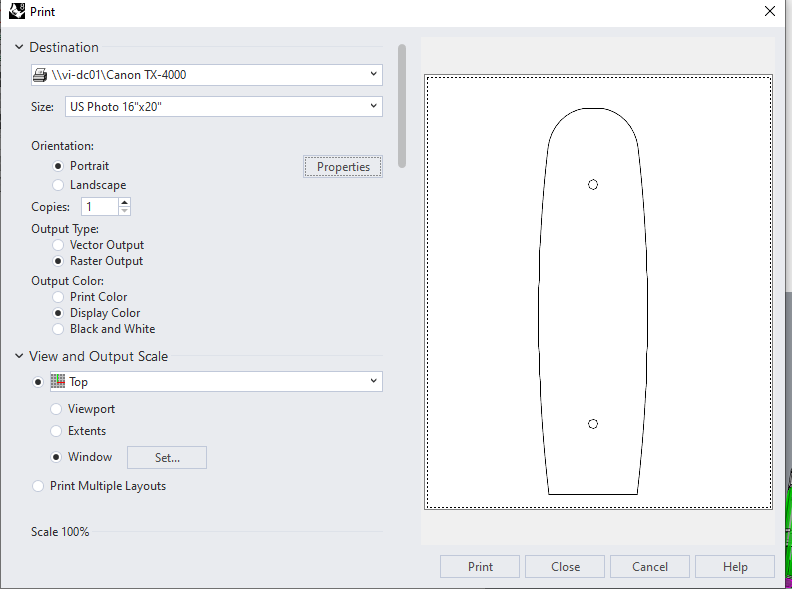
Anyone have issues with plotter custom size settings in Rhino 8.
Plotter is Canon TM - 305.
I normally change custom sizes through File/Print/Properties/Page SetUp.
No problem doing this in v7, no reaction to input in v8.
Any other way around this?
Reverted back to v7.
Windows 11 (10.0.22631 SR0.0) or greater (Physical RAM: 64GB)
.NET 7.0.0
Computer platform: LAPTOP - Plugged in [100% battery remaining]
Non-hybrid graphics configuration.
Primary display and OpenGL: NVIDIA GeForce RTX 4080 Laptop GPU (NVidia) Memory: 12GB, Driver date: 12-6-2023 (M-D-Y). OpenGL Ver: 4.6.0 NVIDIA 546.33
> Integrated accelerated graphics device with 4 adapter port(s)
- Windows Main Display is laptop’s integrated screen or built-in port
Primary OpenGL: NVIDIA GeForce RTX 4080 Laptop GPU (NVidia) Memory: 12GB, Driver date: 12-6-2023 (M-D-Y). OpenGL Ver: 4.6.0 NVIDIA 546.33
> Integrated accelerated graphics device with 4 adapter port(s)
- Windows Main Display is laptop’s integrated screen or built-in port
Secondary graphics devices.
Intel(R) UHD Graphics (Intel) Memory: 1GB, Driver date: 6-15-2023 (M-D-Y).
> Integrated graphics device with 4 adapter port(s)
- There are no monitors attached to this device. Laptop lid is probably closed
OpenGL Settings
Safe mode: Off
Use accelerated hardware modes: On
Redraw scene when viewports are exposed: On
Graphics level being used: OpenGL 4.6 (primary GPU’s maximum)
Anti-alias mode: 4x
Mip Map Filtering: Linear
Anisotropic Filtering Mode: High
Vendor Name: NVIDIA Corporation
Render version: 4.6
Shading Language: 4.60 NVIDIA
Driver Date: 12-6-2023
Driver Version: 31.0.15.4633
Maximum Texture size: 32768 x 32768
Z-Buffer depth: 24 bits
Maximum Viewport size: 32768 x 32768
Total Video Memory: 12282 MB
In Rhino7, the size would automatically change to “Custom Size”. In Rhino8, the size automatically changes to US Photo 16"x20", no matter what size I put in the printer properties.
That looks like a bug to me.
Maybe with these steps @stevebaer can figure it out.
It may be difficult to fix this since no one in Rhino development or support has one of those large format printers. Hopefully it’s a general printing issue and not specific to the Canon printer.
As a work-around, you can print using the RhinoPDF printer, then send the resulting PDF file to your plotter.
That should work.
You can also try the Rhino 8 Service Release Candidate 7.
In Rhino Options > Updates and Statistics > Update frequency > Service Release Candidate.