rteuman
October 10, 2022, 1:42pm
1
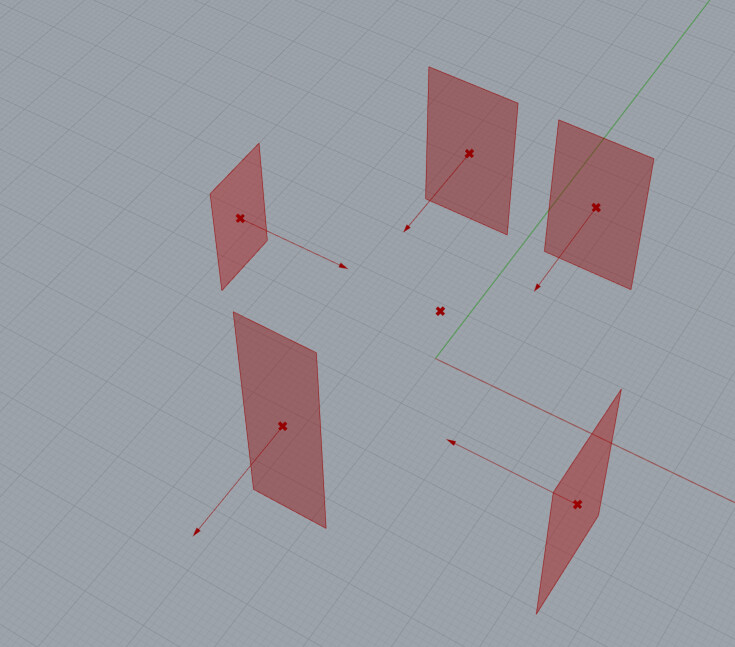
Hello All, I have a bunch of vertical surfaces and a point in between all of them. As you see some of the surface normals are pointing outwards and some in the direction of the point.
I’m wondering if there is a way to flip all the surfaces so that all the surface normals point towards the point, as I manually did here:
here’s the file:flipsurfacenormaltowardsapoint.gh (21.4 KB)
Thank you!
HS_Kim
October 10, 2022, 2:19pm
4
You could also use Plane Closest Point .
flipsurfacenormaltowardsapoint_re.gh (11.0 KB)
dfytz1
October 10, 2022, 2:38pm
5
wow, never thought about it this way!
11165
October 10, 2022, 2:39pm
6
I think in his example the surface happened to cover the “center point”. but not his original intention.
rteuman
October 10, 2022, 7:41pm
7
Thank you all so much this works!!
Macuso
November 10, 2022, 12:32pm
8
Improved a little bit the HS_Kim definition and eliminated the need to define a point.
Flip_Surface_Normal_Towards_Point_re.gh (11.2 KB)
rteuman
November 10, 2022, 8:37pm
9
Nice! even better, thank you
R
This is the best solution that I have ever seen.
@dfytz1 I mean, it’s just a bunch of vector math that compares the z-component of the surface frames with the vectors of the surfaces to a given point. The dot product gives a negative or positive value which can be used as a mask pattern for flipping the surfaces:
which looks a little more involved until you reduce it with an expression:
or hide it completely within an Evaluate component:
flipsurfacenormaltowardsapoint VR.gh (40.9 KB)
dfytz1
February 26, 2026, 3:32pm
12
Man you’re visiting some very old topics! Haha back then i was only beginning to learn grasshopper:)
I’m going through Kim’s old posts to see a master at work.
We also now have
Reverse Surface which trivializes this further: