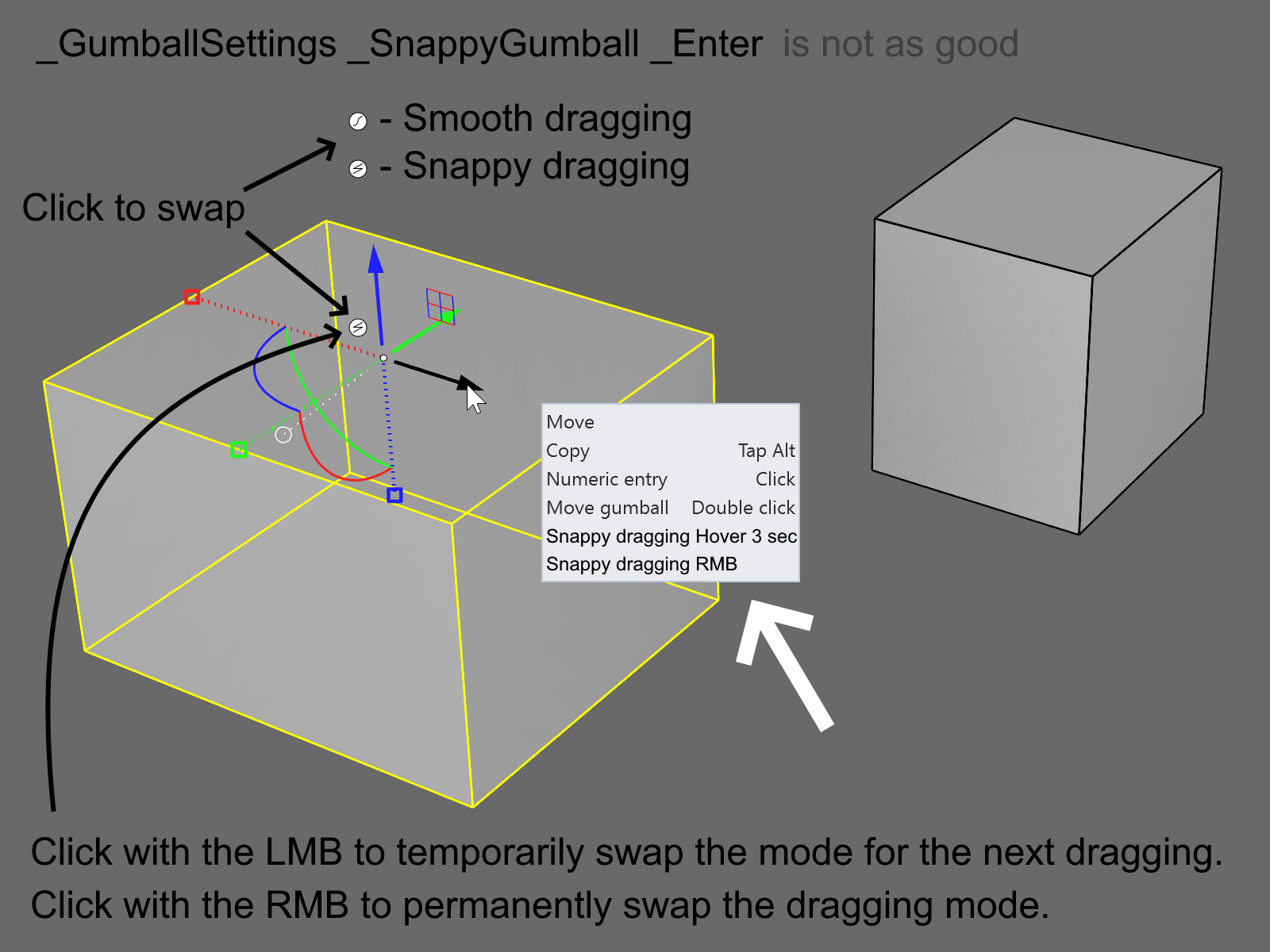
I just downloaded the latest BETA from today and noticed that the Gumball always snaps to the nearby geometry when I try to adjust some control points, despite that the white Options handle is a circle (indicating “Smooth dragging” mode).
I no longer see the “Snappy dragging” and “Smooth dragging” options. When the Gumball is in “Snappy dragging” mode the white Options handle should be a diamond (a square rotated by 45 degrees). It was very handy to have those two options to choose from, but now they are gone…
Is that an accidental regression that comes after the recent fix of the huge delay caused by reading the display modes 5 times each while trying to access the Gumball options page?
One of the first things I noticed not working for me, too. I toggle between Snappy and Smooth all the time via a key command and that no longer works. I have generally been very happy with the WIP 9 releases, but the last two releases have frustrated me. The release before last changed how layer sorting works (I didn’t see a bug for it, so I guess I’ll create one) and then this snappy/smooth issue. Hopefully, these are small bumps in the road that will get smoothed over. Overall, I like where Rhino 9 is going.
The bug for removing the smooth and snappy modes is RH-97751. The gumball snappy/smooth behavior is now this:
Every drag starts as smooth
If OSnaps are off it stays smooth
If OSnaps are on (or toggled on with alt) the drag stays smooth until you hit a snap point, then it becomes snappy. This means the gumball doesn’t jump until you hit a snap point.
If you hit a snap point and you hold alt to disable snaps you go back to smooth dragging
I’ve hoped for awhile we could simplify the gumball snappy/smooth behavior away by tying them to OSnaps. I’d really appreciate if you give it a try and let us know how it feels. The change isn’t permanent.
For me this makes a lot of sense and makes the gumball more coherent with the rest of the interactions.
It also reduce the number of thing I’ve to exaplain the first day.
BIG for me.
Just a question: what’s the behaviour with the scale ? Is the dimension scale still available?
While I understand the intent to minimize the UI, the removal of the undisputed “Smooth dragging” is a crime for everyone who uses a 3d mouse and does a lot of control point “massaging”. The issue becomes especially huge while using “Drag strength” due to the increased travel of the mouse pointer. But even at normal speed (“Drag strength” turned off) the auto-snapping remains a huge mistake.
Forcing me to hold the Alt key thousands of times per day, or to turn off my Osnaps, or to zoom-in super close to reduce the risk to snap to other geometry by accident, is a huge NO. This must be the worst decision regarding the Gumball in years. At lest from my perspective of someone who:
Use a 3d mouse;
Do a lot of control point “massaging” for hours per day;
Uses Osnap all the time for all other tools (outside dragging of control points).
At least DISABLE “Snappy dragging” while in “Align to control polygon” mode. I can’t work with snapping while I deal with a large number of control points around that activate the unwanted snapping.
Or simply add a 3rd, new “Hybrid dragging” mode (your new implementation) while KEEPING the classic “Smooth dragging” and “Snappy dragging” modes to make all Rhino users happy. More options while NOT DELETING old functionality = better for everyone.
Some time ago I made a proposal (1st image) to implement a new hybrid mode (while still leaving “Smooth dragging” and “Snappy dragging” as available options) where the Gumball behaves as “Smooth dragging” by default unless the user moves the mouse pointer at 90 degrees away from the initial direction of moving (arrow handle to move or square handle to scale) or rotating (arc handle to rotate) the active Gumball handle. This is the most intuitive approach ever possible and eliminates the need to hold the Alt key every time or to entirely deactivate the Osnaps.
Another proposal (2nd image) was to be able to set “Smooth dragging” to the LMB, and “Snappy dragging” to the RMB. Or vice versa. Depending which mode the user prefer as their default mode. This hybrid mode combines both, “Smooth dragging” and “Snappy dragging” while not forcing the user to turn off the Osnaps entirely or to hold the Alt key thousands of times per day.
Here are some of my old proposals that were not found useful by the developers at the time:
@Joshua_Kennedy , check the video posted by @Charles above. One of my proposals which I wrote about in my earlier post is what you see in the video, with one exception:
When the user moves the Gumball arrow along its vector, it should operate in “Smooth dragging” mode (but skipping the auto-snapping that occurs at the beginning of the video).
However, when the user moves the mouse pointer away from the vector of the Gumball handle (like 70-90 degrees away and more than a set number of pixels, such like more than 100 pixels), the Gumball switches to “Snappy dragging”. You can see this “moving away” starting at the middle of the video. Then the user will be able to snap to objects that are even in front of the vector when the mouse pointer is moved back to its original location. Then Gumball returns to the “Smooth dragging” mode either after completion of the moving (or rotation or scaling) and releasing of the LMB or after holding the Alt key for more than 2 seconds.
Been using this for a few days and once I adjusted to it, I like aspects of this workflow. Biggest con for me is that I press ‘alt’ too soon and end up dragging off a duplicate of whatever it is I’m trying to move without snapping. Lots of extra surfaces, polysurfaces, stray points, etc. created this way, lol. But as I adjusted to it, the duplication became less of an issue. Overall, I would still want to be able to directly toggle between Smooth and Snappy gumball dragging.
I used the latest BETA very few minutes due to this regression. It’s beyond tolerable. Using Gumballt his way around bunch of control points and adjacent surfaces is a nightmare.
in this clip, I’m simply trying to nudge a tiny amount to the ‘left’ & every time, the gumball jumps to the ‘right’ (among other directions). so there’s a def jump at the initial click/drag. this is also tested with an empty scene.


 for me.